

After producing 1,200+ videos for 650+ AI, SaaS, Fintech, HealthTech, and B2B companies at What a Story, the pattern is clear:
Most product demo videos lose viewers in the first 10 seconds - and never recover.
- Not because the product is weak.
- Not because the visuals are poor.
- But because the script is solving the wrong problem.
The wrong problem is: how do we explain what our product does?
The right problem is: how do we trigger a decision in a viewer who is skeptical, distracted, and has twelve other options?
Those are different briefs. They produce different videos. And only one of them converts.
This guide shows how to structure and write a demo script that actually moves viewers to act.
Let’s start,
At What a Story, we’ve analyzed the drop-off heatmaps of 1,200+ videos. The verdict? You have 8 seconds to prove you aren't wasting their time.
What Is a Product Demo Video Script?
A product demo video script is a structured outline that guides how a product is presented in a video to drive user action. It includes a hook, problem, solution, product walkthrough, proof, and a clear call to action.
Why Most Demo Scripts Don’t Convert
Most teams treat demo videos like product tours.
They: Open with a logo, Walk through features and End with “Get started today”
The result feels like a software manual - accurate, but forgettable.
Here’s the assumption behind most demos: the viewer is watching to learn about the product.
They’re not.
By the time someone watches your demo, they already know your category. They’re not gathering information - they’re validating a decision they’re already considering.
The question is simple:
Is this the right choice for someone like me?
That breaks down into three parts:
- Does this understand my problem?
- Is this built for someone in my situation?
- Will this actually work?
A product-tour script doesn’t answer these questions.
A script built around the viewer’s decision journey does - starting with their problem, proving value clearly, and closing with a simple next step.
If your script doesn’t do this, the rest of the video doesn’t matter.
How to Write a Product Demo Video Script
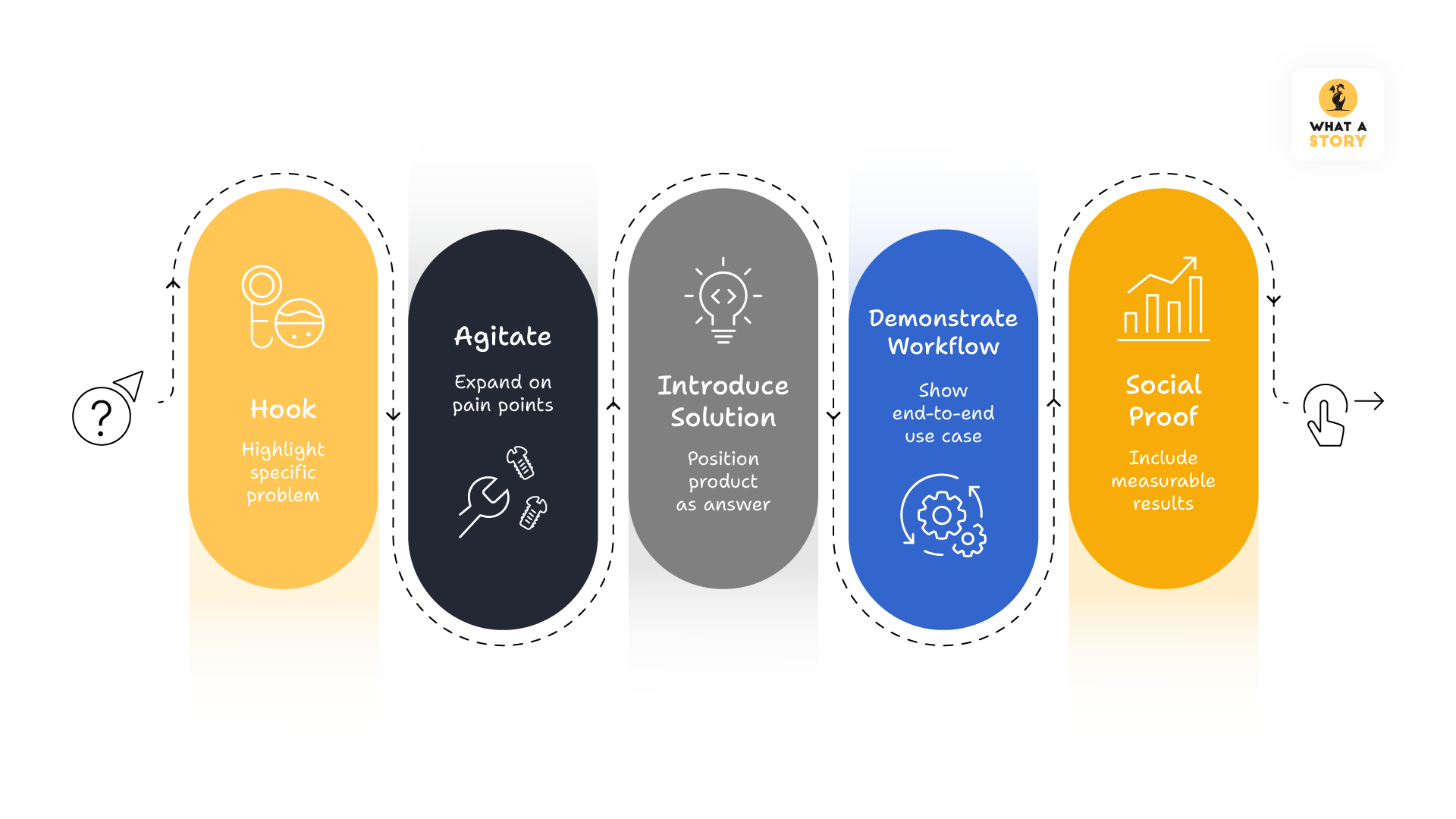
Start with a hook that highlights a specific problem: - Open with a clear, relevant problem or missed opportunity to capture attention.
Agitate the problem to build urgency: - Expand on the pain so the viewer recognises the impact and stays engaged.
Introduce the product as the solution: - Position your product as the direct answer to the problem.
Demonstrate one key workflow clearly: - Show a single use case end-to-end instead of listing multiple features.
Add social proof with measurable results: - Include specific data points to show real outcomes.
End with a single, clear call to action: - Give one simple next step that guides the viewer toward action.
The Proven Demo Script Structure
Across high-performing demo videos, the structure stays consistent regardless of format or industry.
Here’s how it breaks down:
The hook: 0 to 8 seconds
You have about eight seconds before a viewer decides if this is worth their attention. This is not the time to introduce yourself. It’s the moment to make the viewer feel immediately seen.
Strong hooks do one of three things: expose a costly problem, quantify a missed opportunity, or challenge a familiar workflow.
Consider the difference:
Version A: “Hi, we’re [Product], the analytics platform built for performance marketers.”
Version B: “What if you could find the campaign leaking 40% of your ad budget in under 60 seconds?”
Version A is accurate. Version B is relatable and aspirational. It reflects a real frustration and makes it feel solvable. The viewer who recognises that problem doesn’t leave.
The rule: never open with your company name, tagline, or logo animation. These mean nothing to someone discovering you for the first time. They waste the most valuable seconds of the video.
“Video retention drops sharply in the first 10–15 seconds when the opening lacks relevance.”
Problem agitation: 8 to 25 seconds
Once you have attention, resist the urge to introduce the product.
Spend the next fifteen seconds deepening the pain. The goal is not to list problems, but to make one problem feel real and costly.
Make it concrete. Not “teams struggle with data fragmentation,” but: “Every Monday, someone is pulling numbers from multiple platforms, merging them into a spreadsheet, and hoping the report they send is accurate. It usually isn’t.”
This does two things:
i. It validates the viewer’s frustration, building trust
ii. It raises the stakes, so the solution feels meaningful
In our experience, when scripts spend more time here, watch-through rates improve - not because of animation, but because viewers recognise themselves before the solution appears.
Value Proposition: 25 to 35 Seconds
Now introduce the product.
Position it as the bridge between the problem and the desired outcome.
Use one clear sentence:
“[Product] helps [specific user] achieve [specific outcome] without [core frustration].”
Specificity matters:
- The exact user, not “teams”
- A measurable outcome, not vague benefits
- The core frustration already established
Avoid stacking benefits. One clear outcome is easier to process than multiple competing claims.
The Core Demo: 35 to 75 Seconds
This is where most scripts collapse.
The instinct is to show everything - features, integrations, customisations. The result is overwhelming. And overwhelmed viewers don’t convert.
The fix: show one thing exceptionally well.
Focus on one workflow - a complete sequence that demonstrates value clearly.
Narrate outcomes, not actions.
“Click the reports tab” explains the product.
“Get your weekly performance summary in seconds so your team can focus on strategy” explains the outcome.
That shift improves engagement and perceived value because the viewer sees what changes for them.
Keep runtime under 90 seconds for landing pages. Extend to 3-6 minutes for sales-stage videos only if addressing specific objections.
“This is the point where most clients push to add more features - and where performance usually drops.”
Social Proof: 75 to 85 Seconds
This is the moment in the video where scepticism peaks. The viewer has watched the hook, felt the problem, heard the value proposition, seen the demo.
They're interested. And precisely because they're interested, they're now applying the most critical scrutiny: does this actually work for companies like mine?
What you need here is not more proof. It's more believable proof.
One or two specific data points outperform a paragraph of testimonials. "Teams using this reduced wasted spend by 22% within 30 days" is more persuasive than three sentences of quoted praise because it's measurable, it's time-bounded, and it answers the sceptical viewer's actual question, which is not "do people like this product?" but "what specifically changes when they use it?"
If you have a recognisable client name, this is where it earns its place. If you have a specific outcome from a specific company, even better.
The goal is to make the viewer feel that the decision they're already halfway toward is the right one.
Call to action: Final 8 to 12 seconds
One action. Not multiple options.
The viewer has already done the work. Now they need a clear, low-friction next step.
Strong CTAs are specific and reduce risk:
“Start your 14-day free trial, no credit card required”
“Book a 15-minute setup call”
Multiple CTAs create decision paralysis. Match the CTA to the funnel stage and make it the only action.
Check out this: Explore UI trends that make your product videos feel intuitive, modern, and high-converting.
Production Details That Influence Conversion
A great script can be undermined by weak execution. A few principles impact whether viewers stay engaged:
Show real product screens: Polished animations look impressive, but they can reduce authenticity. Viewers want to see what they’re actually signing up for.
If you use animation for clarity, include a brief sequence of the real UI.
Add captions: Many people watch videos without sound on mobile or in offices. Captions ensure your message lands regardless of the audio.
Use visual cues: Highlights and cursor emphasis direct the viewer's eye to what matters. Don't make them hunt for the relevant element.
Tight synchronization: Every sentence should be supported by what's visible on screen at that exact moment.
Measuring Success
Publishing the video is just the beginning. The data tells you where the script is working.
The most useful metric is watch depth. A high drop-off in the first 10 seconds means your hook isn't landing. A cliff at the 60% mark often signals the demo section went too long or lost focus.
Track the CTA click-through rate and compare trial signup rates between viewers and non-viewers. This tells you if the script is doing its job at a business level.
Test one variable at a time, such as the hook, the CTA wording, or the demo length. Building an improvement loop into your workflow helps you refine the message over time.
Don't miss this to read: Learn why SaaS demos fail and how storytelling turns them into lead-generating assets.
The Checklist Before Anything Goes Live
Before any demo video we produce at What a Story is delivered to a client, it runs through a set of questions that exist precisely because the pressure to add things, more features, more benefits, more proof, more CTAs is constant and almost always wrong.
☑ One persona, one problem, one use case
☑ Hook creates immediate relevance (not curiosity alone)
☑ Problem feels specific and costly
☑ Product is introduced as a solution, not a tool
☑ Demo delivers one clear “aha” moment
☑ Social proof is concrete and believable
☑ CTA is singular and frictionless
☑ Every line has a visual purpose
☑ Captions are accurate and readable
Real SaaS Demo Script Examples
We’ve compiled real, high-converting SaaS demo scripts used across different categories - CRM, AI, analytics, and developer tools.
Each script includes a clear structure and breakdown so you can understand not just what works, but why it works. Download the full guide below.
The Last Thing
A demo video that converts is structurally disciplined through and through.
The structure is learnable. The discipline of saying no to the fourteenth feature, resisting the second CTA, spending fifteen seconds on the problem when the client wants to get to the product faster is harder.
Because it requires trusting that the viewer's journey matters more than the brand's desire to be comprehensive.
Get the structure right, write the way real people talk, show one thing exceptionally well, and close with a clear invitation to take the next step.
That formula, applied consistently, is what separates demo videos that drive growth from demo videos that just fill a landing page.


